

Log in or Sign up to remove sponsor

You Will Need

10 minutes
So-so

The Gradient Mesh Tutorial(For Illustrator)

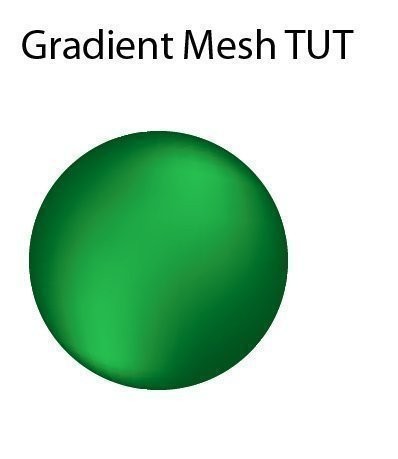
  • Completed Project: The Gradient Mesh Tutorial(For Illustrator) Picture #1

tricky at first then easy afters

to add depth into your illustrations

Share on: Facebook | Twitter | StumbleUpon

Add to a List Add to Favorites Add Your Version


  1. Step 1

    for this tut open a new page in illustrator

    file>new

  2. Step 2

    Step 2

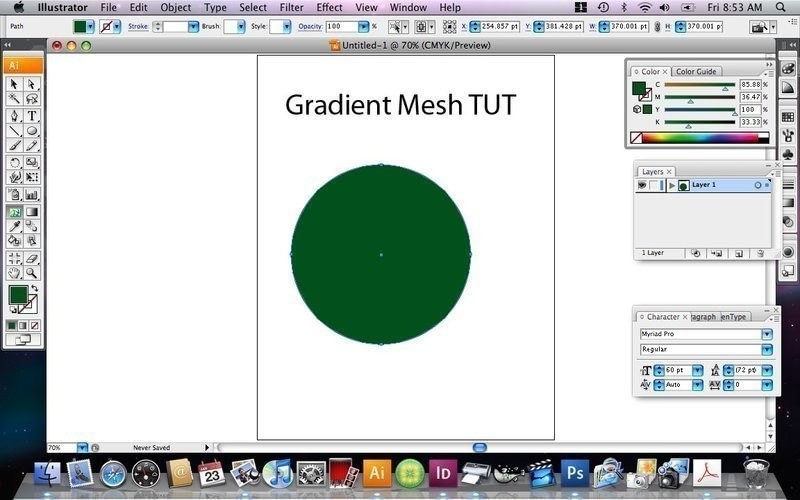
    in the tools bar pick the circle

    draw one on the page


  3. Step 3

    Step 3

    go to the colour pallet and choose a colour

  4. Step 4

    Step 4

    now go back yo the tools bar and click the gradient mesh tool


  5. Step 5

    Step 5

    pick a spot on the circle and click on it

  6. Step 6

    Step 6

    now go back to the tools bar and click on the colour pallett, choose a new colour

  7. Step 7

    Step 7

    now the spot you had clicked should turn that colour

  8. Step 8

    Step 8

    repeat that step untill you get your desired image

More from Computer ArtSee All »
  • The Gradient Mesh Tutorial(For Illustrator)How To
  • Make A Illo In Adobe Illustrator Part 2How To
  • How To Make An Illo In Adobe IllustratorHow To

See more Artwork

People who love this project (5)See All »

Leave a Comment

Sorry...

You need to Sign Up and log in to leave comments


michelle G. Posted By:
michelle G. »
January 23, 2009 14:14
Hr

See the projects A-Z »


Advertise here

Hr

Hr

Popular tags: Dressmaking / Tailoring, Revamping, Painting & Decorating, Christmas, Decorating, Gothic, Clothing & Fabric, and Beadwork

Hr

Get the latest projects!
Fbpage Become a Fan on Facebook
or
Follow us on Twitter