







About
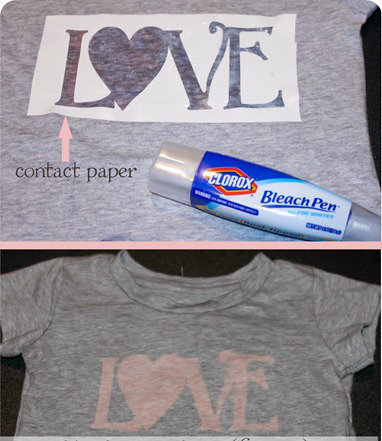
A cute and simple shirt you can make on your own.
They are really simple to make. For those of you that have a cutting machine such as a Cricut or Silhouette and can import svg files I have created this ‘Love’ image for you to download.
Tags
Downloads
- bleach_pen_svg.htm 27.3 KB [ Download ]
-
 Amanda M. favorited Bleach Pen 'Love' T Shirts
01 Mar 04:06
Amanda M. favorited Bleach Pen 'Love' T Shirts
01 Mar 04:06
-
 Nora E. added Bleach Pen 'Love' T Shirts to Projects to try
05 Apr 18:47
Nora E. added Bleach Pen 'Love' T Shirts to Projects to try
05 Apr 18:47
-
 Lady Kumquat favorited Bleach Pen 'Love' T Shirts
15 Sep 18:19
Lady Kumquat favorited Bleach Pen 'Love' T Shirts
15 Sep 18:19
-
 tailoveshbk favorited Bleach Pen 'Love' T Shirts
13 Sep 01:44
tailoveshbk favorited Bleach Pen 'Love' T Shirts
13 Sep 01:44
-
Andrea N. favorited Bleach Pen 'Love' T Shirts
09 Sep 23:51
-
 GothicYolita favorited Bleach Pen 'Love' T Shirts
28 Jul 04:24
GothicYolita favorited Bleach Pen 'Love' T Shirts
28 Jul 04:24
-
 Jackie_bo_backie favorited Bleach Pen 'Love' T Shirts
25 Jul 00:06
Jackie_bo_backie favorited Bleach Pen 'Love' T Shirts
25 Jul 00:06
-
 Meaghan N. favorited Bleach Pen 'Love' T Shirts
22 Jul 23:44
Meaghan N. favorited Bleach Pen 'Love' T Shirts
22 Jul 23:44
-
Madeleine A. favorited Bleach Pen 'Love' T Shirts
19 Jul 08:11
-
 angel.hackney1978 favorited Bleach Pen 'Love' T Shirts
14 Jul 15:24
angel.hackney1978 favorited Bleach Pen 'Love' T Shirts
14 Jul 15:24
-
 Step 1
Find a piece of cardboard and place it inside the shirt under image. You don’t want the bleach to run through on both sides
-
 Step 2
Cut out your image on contact paper using the one I designed or any other stencil you may have. You could even buy large stickers and use the negative side to stick onto your shirt.
-
 Step 3
Place your image on your shirt where you want it and press it down so that there are no openings. Take your bleach pen (you can buy them at The Dollar Tree now!) and ‘color’ in your image
-
 Step 4
Wait 10-25 minutes for the bleach to start working. The gray shirt turned out so cute because it turned this pinkish color. I think it took about 15 minutes. On darker shirts it may take a bit longer for the bleach to start working.
-
Step 5
Once you are happy with the color take off the contact paper. Don’t worry if it’s not perfect. It makes it unique! Run the bleached part of the shirt under cold water and wipe most of the bleach off with your hands. Then wash your t-shirt in the washing machine.